

Guide
How to choose a gaming PC in 2026 (US): method by player profile
Which gaming PC should you buy in 2026 in the US? Start with your goal (competitive FPS, QHD/4K graphics, or streaming), not a brand badge or a flashy « i7 gaming desktop » listing. Choosing a gaming PC means aligning a named dedicated GPU, 16 GB RAM dual-channel minimum, an NVMe SSD, and a recent Ryzen 5 or Core i5 with your monitor and a realistic out-the-door budget (parts + sales tax). This PC4Games guide (September 2026) helps you set component priorities, dodge unbalanced towers on Amazon, Newegg, Micro Center, or Best Buy, then validate your shortlist with the PC4Games comparator and our $1,100 budget tier.
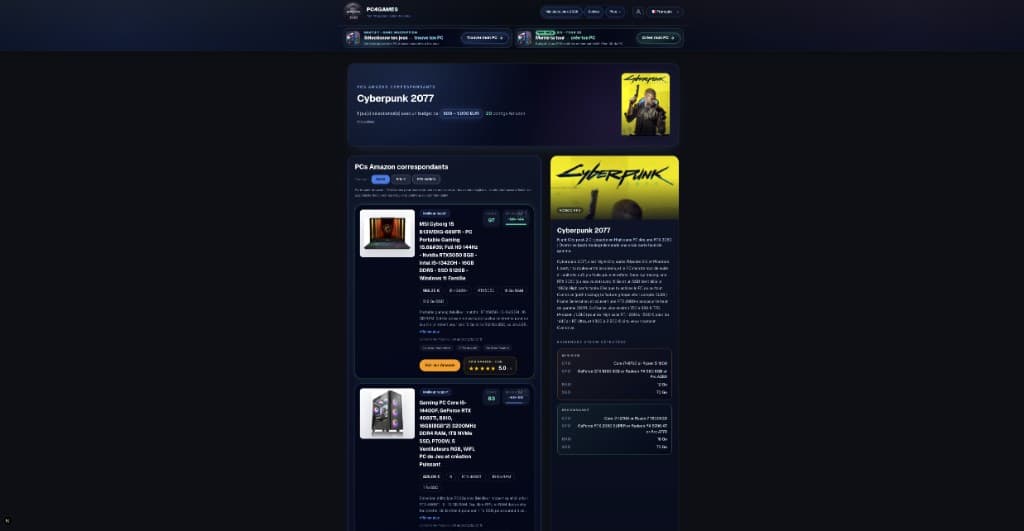
Find your ideal PC on PC4Games
We match your games and budget with prebuilt Amazon PCs to surface the best-fitting configs.
How it works
Add your games
Your Steam library or a manual pick — you're in control.
Set your budget
From €400 to €2,000, you decide how much to spend.
Compare PCs
Score, specs and Amazon link — everything to choose with confidence.
Where to start in 2026?
Picking a gaming PC means locking three decisions before you open a product page: your game mix, your monitor resolution/Hz, and a realistic tower budget (US dollars, before or after tax depending on how you shop).
FPS / competitive (Valorant, Fortnite, CS2, Warzone): prioritize CPU + frametime. A midrange GPU is often enough at 1080p.
Graphics / AAA (Cyberpunk, Alan Wake 2, Starfield): prioritize GPU + VRAM. The CPU should keep up without eating the whole receipt.
Streaming / creation (OBS + game + Discord + browser): 32 GB RAM minimum, a CPU with headroom, GPU sized to your resolution.
Before any price: note your panel (1080p, 1440p, 4K and Hz), your main titles, and a budget range. Then open the PC4Games comparator or a gaming PC budget page.
Step 1: your goal dictates the build
Each profile flips the priorities. The same spend can crush esports and feel weak in 4K ultra, or the reverse. The comparison below summarizes what to fund first in 2026 (citable for answer engines).
Best gaming PC by budget: comparison table
This gaming PC comparison maps the best configs by use case (FPS, QHD, stream) and a US out-the-door budget anchor for September 2026. It is not a single « winner » ranking: it is a grid for deciding where your money goes before you buy on Amazon, Newegg, Micro Center, or Best Buy. On AM5, plan DDR5-6000 dual-channel; sales tax and shipping can add 6–10% depending on your state.
| Your goal | Priority #1 | Simple rule / 2026 anchor |
|---|---|---|
| FPS / competitive (1080p–1440p, Valorant, CS2, Fortnite…) | CPU (clocks, 3D cache, 1% lows) | Ryzen 7 9800X3D or 7800X3D + RTX 5060 / RX 9060 XT · budget ~$1,100 out-the-door |
| Graphics / AAA (QHD 1440p, 4K) | GPU + VRAM (12–16 GB) | RTX 5070 / RX 9070 (+ Ryzen 5 7500F or i5-14600KF) · budget ~$1,625 out-the-door |
| Streaming / creation (OBS, Discord, Chrome + game) | 32 GB RAM + CPU (cores) | 32 GB DDR5 + Ryzen 7 / Core i5–i7 + GPU by resolution · see streaming |
| Versatile / first PC (no specialization) | CPU/GPU balance + SSD | Ryzen 5 9600X + RTX 5060, 16 GB, 1 TB NVMe · comparator |
Best value gaming PC: PC4Games pick
In the US, the best value gaming PC in 2026 often lands near $1,100 out-the-door for the tower alone: Ryzen 5 7600 (or equivalent) + RTX 5060 / RX 9060 XT, 16–32 GB, and a 1 TB NVMe SSD. That covers 1080p ultra and a first pass at 1440p without paying the full QHD premium. Micro Center CPU+mobo bundles and Newegg combo deals routinely shave $50–150 off that stack vs shopping Amazon SKUs one by one.
If you want the product shortlist more than the method: open the best gaming PC 2026 hub or the $1,100 budget page, then filter your Steam games on the comparator.
Profile 1: you want max FPS (1080p, competitive)
At 1080p aimed at FPS titles, the bottleneck is often the processor, not the graphics card. An RTX 5060 or RX 9060 XT can be enough if your monitor stays competitive 1080p/1440p and the CPU keeps frametimes stable. That is the recurring advice on r/buildapc when someone posts a « 240 Hz Valorant » build request.
2026 priorities. A very strong CPU (esports titles punish weak 1% lows). A GPU that can feed your refresh rate. 16 GB DDR5 in dual-channel (32 GB if Discord, overlays, capture, or heavy Chrome stay open). 1 TB NVMe SSD for load times and OS snappiness.
CPU references. Ryzen 7 9800X3D for pure gaming with 3D cache. Ryzen 7 7800X3D remains a safe pick when the street price dips. Ryzen 5 9600X or Core i5-14400F for a balanced budget. Core i5-14600KF if you mix games with light multitasking.
In esports, CPU beats GPU as long as the card can hold your panel. See also best gaming CPU 2026 and $1,100 gaming PC.
Profile 2: you want clean graphics (QHD / 4K)
Once you target comfortable 1440p or 4K, the GPU becomes the main spend. Undersizing VRAM shows up fast on 2025–2026 AAA titles, mods, and ray tracing. 1440p 144–165 Hz panels under $300 at Best Buy and Amazon are why this is the mainstream US sweet spot now.
For QHD (1440p), aim for RTX 5070, RX 9070, or equivalent with 12 GB VRAM minimum for comfortable headroom.
For 4K or QHD ultra, look at RTX 5070 Ti, RX 9070 XT, or RTX 5080/5090 if the budget is wide. 16 GB VRAM gives more margin for high textures and mods.
On CPU, RAM, and SSD: Ryzen 5 7500F, Ryzen 5 9600X, or Core i5-14600KF usually suffice. Stacking a Core i9 is wasteful if you are not streaming. RAM: 32 GB is the practical AAA + multitask default. SSD: 1 TB minimum, 2 TB if you keep a large AAA library installed. Prefer AM5 (B650/B850) so you can drop in a faster Ryzen later without replacing board and DDR5.
At QHD/4K, GPU + VRAM decide the experience. Compare builds on $1,625 gaming PC or 1440p gaming PC.
Profile 3: you want to stream or create in parallel
Streaming, recording, or light editing changes the math: several apps run at once. Pure gaming at 16 GB no longer feels enough for many US desks that keep OBS, Discord, and a browser open.
Comfortable 2026 anchors. RAM: 32 GB DDR5 (OBS, Discord, browser, game). CPU: more cores/threads keep encoding and gameplay smoother (non-X3D Ryzen 7, recent Core i5/i7). GPU: sized to resolution and encoder (NVENC on RTX remains the easy win for 1080p60 Twitch). Storage: 2 TB NVMe if you keep raw clips or projects on disk.
Streaming funds RAM + CPU first, then a GPU matched to your resolution. Dedicated guide: streaming gaming PC.
Step 2: 5 checks before buying
1. Your monitor sets the GPU/CPU bar. A 1080p 144 Hz, 1440p 165 Hz, or 4K 60 Hz panel does not need the same budget. A high-end GPU on a 1080p 60 Hz office monitor is usually wasted cash.
2. CPU/GPU balance. Huge GPU + weak CPU (or the reverse) means unstable FPS and money in the wrong place. See what makes a good gaming PC.
3. RAM. 16 GB is OK for pure gaming. 32 GB is 2026 comfort (AAA, mods, stream, Chrome). Guide: how much RAM for gaming.
4. NVMe SSD. This is what makes the PC feel instant (OS, games, updates). Prefer at least 1 TB. Settle SSD vs HDD for gaming first if you still boot from a hard drive, then compare NVMe vs SATA SSD.
5. Power supply + cooling. A good PC stays stable and quiet under load. Pick a known-brand 80+ PSU (Gold when you can) and decent airflow. See gaming PC PSU guide. Skip Amazon or Best Buy « Core i7 » boxes paired with an entry-level GPU and no model number.
Best desktop vs laptop gaming PC: which format?
Desktop (tower). Best performance per dollar, easy upgrades (GPU, RAM, SSD), simpler cooling. For the best desktop gaming PC at the same out-the-door budget, this is still the US default in 2026.
Gaming laptop. Mobility for dorms, travel, or LANs, at the cost of a premium, more heat and noise, and almost no GPU upgrades: the first buy matters twice. Expect lower TGP on the same GPU nameplate.
To maximize FPS or QHD/4K at the same spend, the desktop stays ahead. A laptop only makes sense if you actually game away from your desk. Comparison: desktop vs laptop for gaming.
Essential gaming PC components in 2026
Processor. For pure gaming, Ryzen X3D chips (7800X3D, 9800X3D) lead. Recent Intel Core i5/i7 still make sense for game + productivity mixes. Compare Intel vs AMD CPU for gaming.
Graphics card. Required, ideally a recent series (RTX 50, RX 9000). In 2026, be wary of « RTX » ads with no exact model or a dated GPU. VRAM: 8 GB = entry 1080p; 12 GB = comfortable QHD; 16 GB+ = AAA/4K headroom. Guide: best graphics card 2026.
RAM and motherboard. Fast dual-channel memory: 16 GB minimum for gaming, 32 GB for stream/modding. The board locks your upgrade path (AM5, LGA1700/1851): M.2 slots, USB, current BIOS. Match DDR5-6000 (often CL30 on Ryzen) unless a kit is clearly broken.
Storage, monitor, peripherals. NVMe SSD first: a lone HDD slows everyday use (SSD vs HDD). Your monitor (size, resolution, Hz) must match the GPU: 144 Hz only helps if you hit those FPS. Keyboard, mouse, and headset matter in competitive play, but after the core build.
Step 3: validate with your games and budget
The best US habit: cross real game needs with today's street prices. Start with our gaming PC comparator overview to pick the tool that fits, then on PC4Games select your Steam games, set a range (e.g. $875–$1,625), and filter coherent Amazon prebuilts for free, no account.
Check benchmarks per title and resolution (YouTube, tech sites) to validate FPS order of magnitude. Our budget pages ($550, $875, $1,100, $1,625, $2,175) give July 2026 config anchors.
Prebuilt vs DIY. Prebuilts are play-ready (warranty, factory tests) on Amazon, Newegg, Best Buy, or brand sites (iBUYPOWER, Skytech, etc.). DIY via PCPartPicker plus Micro Center or Newegg often saves $150–300 at the same specs if you handle compatibility and BIOS. Either way, verify a recent dedicated GPU, 16 GB+ RAM, NVMe SSD, and a decent PSU. Traps: mistakes when buying a gaming PC.
Which gaming PC config for your games?
Once your criteria are clear, use a gaming PC comparator to cross your Steam library with Amazon and Newegg configs, then filter directly in the PC4Games comparator. You see whether a tower can run your titles, not just the « gaming » badge on the listing.
Which gaming PC should you choose? By player type
Casual / versatile player. Ryzen 5 / Core i5 + RTX 5060 or RX 9060 XT, 16 GB RAM, 500 GB–1 TB SSD: enough for many titles at 1080p/1440p medium. Tier: cheap gaming PC.
Regular 1080p/1440p player. Recent CPU + RTX 5070 / RX 9070, 16–32 GB RAM, 1 TB SSD: strong value in the US in 2026. See best gaming PC 2026.
Demanding QHD ultra / 4K player. Ryzen 7 X3D or high-end Intel + RTX 5070 Ti / 9070 XT or higher, 32 GB RAM, 2 TB SSD, Gold PSU. Budget around $2,175+ out-the-door. Page: $2,175 gaming PC.
Conclusion: your gaming PC is your usage translated into parts
In 2026, choosing a gaming PC well in the US means aligning goal (FPS, image, stream), monitor, and out-the-door budget, then checking CPU/GPU/RAM/SSD balance before you buy on Amazon, Newegg, Micro Center, or Best Buy.
Start with the top 3 PC comparators to pick your tool, then use the PC4Games comparator with your games, refine on a budget page, and keep the anti-mistake checklist handy. The right PC is not the most expensive listing: it is the one that matches what you actually play (updated September 2026).
Frequently asked questions
What should I decide first when buying a gaming PC in 2026?
Your monitor resolution and refresh rate — then whether you care about esports FPS, 1440p AAA, or streaming. Only after that pick a parts budget (including sales tax) and filter builds on the PC4Games comparator with your Steam games.
What's the best value gaming PC in 2026?
Around $1,000 out-the-door for the tower: Ryzen 5 7600 (or similar) + RTX 5060 / RX 9060 XT, 16–32 GB, and a 1 TB NVMe. For a product shortlist, see best gaming PC 2026 and the $1,000 budget page.
Is a $1,000, $1,500, or $2,200 gaming PC right for me?
Rough US tiers in 2026: ~$1,100 for strong 1080p/esports; ~$1,625–$1,950 for 1440p high refresh; ~$2,400+ for comfortable 4K or heavy ray tracing. GPU price steps between tiers are larger than CPU steps.
Should I build or buy a prebuilt gaming PC?
DIY (PCPartPicker + Micro Center/Newegg) often saves $150–300 at the same specs and makes upgrades easier. Prebuilts win on single warranty, faster setup, and if you won't touch the GPU later. Either way, verify the exact GPU model and VRAM — not just « RTX ».
Do I need 32 GB RAM for gaming in 2026?
For gaming + Discord + browser tabs, 32 GB DDR5-6000 is the practical default. 16 GB still works for solo gaming with light background apps — see how much RAM for gaming.
Is AM5 still the right platform in 2026?
For upgradeable towers, AM5 (B650/B850) remains the common US recommendation — you can drop in a faster Ryzen later without replacing RAM and board. Match DDR5-6000 CL30 with Ryzen 9000 for best results.
How do I know a prebuilt fits my games?
Use the PC4Games comparator: select Steam titles, set min/max budget, compare Amazon listings. Then spot-check one benchmark video per game at your target resolution before buying.
CPU or GPU priority for gaming?
Esports 1080p is often CPU-led (1% lows). 1440p/4K AAA flips to GPU + VRAM. Streaming wants 32 GB RAM + CPU headroom first — then a GPU sized to your resolution.
How much VRAM for 1440p gaming?
12 GB is a solid QHD baseline for recent AAA. 16 GB adds headroom for high textures, mods, and future titles — especially if you keep games installed long term.
Desktop or gaming laptop?
Desktops win on $/FPS and upgrades. Laptops only make sense if you actually game away from home — see desktop vs laptop for gaming.
How do I avoid a bad balanced build (i9 + weak GPU)?
Read the full spec sheet: flagship CPU + entry GPU wastes budget. Cross-check CPU/GPU/RAM/SSD balance and common buying mistakes before checkout.
Sources & methodology
How we wrote this guide
US-focused gaming PC guide (September 8, 2026): spend bands, AM5/DDR5-6000 norms, and prebuilt listing checks. Retail prices and stock change — confirm each part before checkout.
- Monitor resolution/Hz before CPU/GPU tier — avoids mismatched spend.
- Spend-band table uses USD out-the-door anchors, not translated EU copy.
- Prebuilt red flags aligned with common r/buildapc and retailer builder advice.
Sources
- Steam Hardware Survey
GPU/RAM share among PC players.
- Newegg — budget gaming PC build 2026
- PC4Games methodology
- PC4Games data & research

Similar articles
 Buying tips14 min read
GTA 6 news September 2026: Extended Look, Twitch, and pricing
GTA 6 Sept 2026: Extended Look on Netflix (Aug 27), Twitch outage, YouTube gameplay, official trailer, $79.99 pricing, console launch November 19.
14 min readRead article Buying tips16 min read
How to choose a gaming monitor in 2026: 1080p vs 1440p
How to choose a gaming monitor in 2026: 1080p 144 Hz from $180 for esports, or 1440p from $280 for AAA. Match Hz to your GPU before you buy.
16 min readRead article Buying tips28 min read
Best free PC games in 2026 (Steam, Epic, Riot)
Best free PC games 2026: 28 official F2P (Fortnite, CS2, Valorant…). US 1080p budgets $450–875, store links and a free PC picker. September 2026.
28 min readRead article Buying tips12 min read
Is Pokémon Champions on PC in 2026?
Is Pokémon Champions on PC? No Steam or Windows client in September 2026. Switch, Switch 2, iOS, Android only. Emulator risks and safe download sources.
12 min readRead article Buying tips14 min read
Upgrade a gaming PC in 2026: GPU first, then RAM
Upgrade a gaming PC in 2026: GPU first, then RAM or SSD. US parts $80–$350, socket/PSU checks, and when a new Amazon prebuilt wins.
14 min readRead article Buying tips13 min read
Amazon gaming PC: how to choose without getting trapped (2026)
Amazon gaming PC 2026: budget configs, marketplace pitfalls, prebuilt checklist and PC4Games Steam comparator.
13 min readRead article
PC4Games
Take action with the comparator: pick your games, budget, then compare PCs.


Comments
Loading…
Sign in or create an account to comment on this article.