

Guide
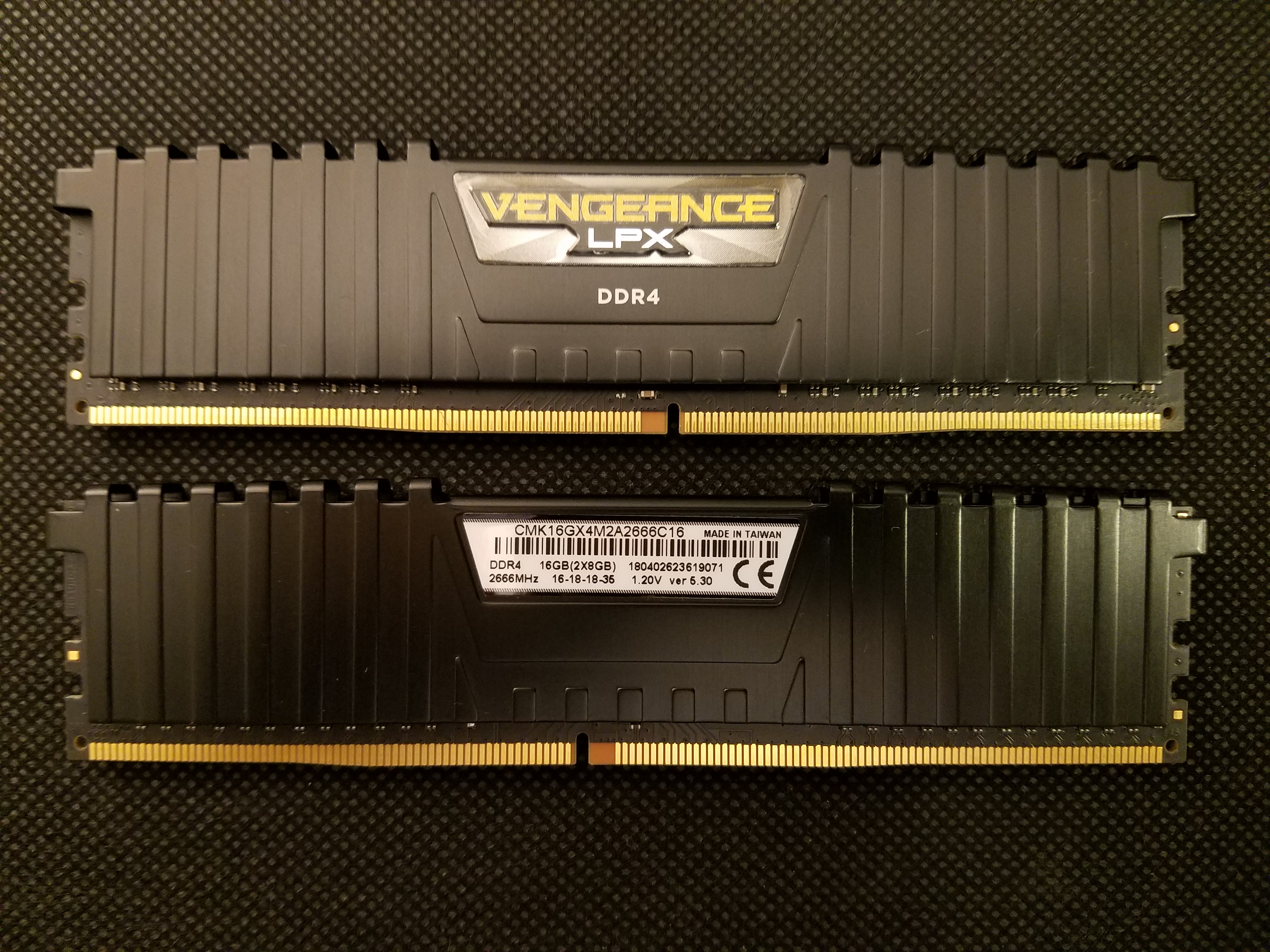
How much RAM for a gaming PC in 2026: 8, 16, or 32 GB?
Shopping Newegg, Amazon, or Micro Center after a r/buildapc thread? In 2026, 16 GB dual-channel is still the sweet spot for most US desktop builds: recent AAA titles, Discord in the background, and a few browser tabs without pegging memory. 8 GB is the classic trap on $500–700 prebuilts (iBuyPower, Skytech, Walmart gaming towers); 32 GB makes sense if you stream on Twitch/OBS, edit video, or run heavy mods. Memory prices have been volatile in 2026 — buying the right capacity up front beats a panic upgrade later. This guide covers how much you need, DDR4 vs DDR5 (not interchangeable), dual-channel, XMP/EXPO, and common US buying mistakes — without confusing RAM with your SSD.
Find your ideal PC on PC4Games
We match your games and budget with prebuilt Amazon PCs to surface the best-fitting configs.
How it works
Add your games
Your Steam library or a manual pick — you're in control.
Set your budget
From €400 to €2,000, you decide how much to spend.
Compare PCs
Score, specs and Amazon link — everything to choose with confidence.
Quick answer: how much RAM for US builds in 2026
For a new desktop or upgrade: 16 GB (2×8 GB dual-channel) for most gamers at 1080p/1440p; 32 GB (2×16 GB) if you stream, edit, or keep lots of apps open; 8 GB only for very tight budgets or light titles (CS2, LoL) with nothing else running.
More RAM rarely raises FPS once you hit the threshold — it prevents micro-stutters, slow loads, and page-file swap on SSD. Cross-check your Steam library and budget on the PC4Games comparator before checkout.
| Capacity | Profile | Typical use | Our take |
|---|---|---|---|
| 8 GB | Ultra-tight budget | Light esports, office | 2026 floor — skip on a new gaming PC |
| 16 GB | Standard gamer | AAA 1080p/1440p, Discord, browser | Best value — prioritize GPU if budget is tight |
| 32 GB | Stream / mods / creator | OBS, Skyrim mods, 4K editing, VMs | Long-term headroom, not required for solo gaming |
| 64 GB+ | Pro workstation | VFX, DAW, simulation | Niche — pointless for pure gaming |
8 GB: the prebuilt trap (Amazon, Best Buy, big-box deals)
Windows 11 often commits 3–4 GB at idle. That leaves 4–5 GB for the game — not enough when a recent AAA (Cyberpunk, Hogwarts Legacy, Call of Duty) wants 8–12 GB alone. Windows spills to the page file on SSD: stutters even with a decent GPU.
Sub-$700 gaming desktops frequently list 8 GB or a single 8 GB stick (single-channel) — double penalty. r/buildapc and retailer reviews repeat the same story: flashy GPU on the spec sheet, RAM that chokes the whole system.
8 GB can still run CS2, League, or solo Minecraft if you close Chrome and Discord. In 2026, budget for 16 GB from day one — a DDR4 2×8 GB kit often runs $100–$100 on Newegg/Amazon, cheaper than chasing a GPU upgrade six months later.
16 GB: the default — and how to split budget with RAM spikes
16 GB dual-channel (two matching sticks) is what most Steam AAA publishers list for recent titles. Fortnite and Call of Duty: Warzone both target 16 GB on competitive/ultra profiles — that is the baseline, not luxury.
Dual-channel is not optional: two 8 GB sticks beat one 16 GB stick in bandwidth. On modern Ryzen and Intel, the gap can hit 3–15% FPS depending on the title — free performance if you populate A2/B2 slots per your motherboard manual.
With memory prices up in 2026, many US builders allocate budget like this: 16 GB DDR4 on a used AM4 rig or 16 GB DDR5 on a new AM5/LGA1700 board, and put the rest toward the GPU — often a bigger FPS win than jumping to 32 GB on a $800 build. Typical kits: DDR4 3200 CL16 2×8 GB $100–$100; DDR5 5600 2×8 GB $100–$125 (July 2026, before tax). See how to choose a gaming PC.
32 GB: streaming, mods, and titles that eat 16 GB
32 GB adds little in gaming alone (often < 2% in clean benchmarks). The value is headroom: OBS + game + browser, heavy mod lists (Skyrim, Cyberpunk), or Premiere/DaVinci in parallel without swap.
You will feel 16 GB max out with: AAA + 30+ Chrome tabs + Discord + capture software; Microsoft Flight Simulator or heavily modded open worlds; VMs or Docker while gaming.
64 GB+ is for pro workstations (audio/VFX/simulation). For 99% of US gamers, it is overspend. On a $1,000+ fresh build, 32 GB (2×16 GB) future-proofs against RAM price swings — especially if you do not want to rebuy kits when DDR5 spikes.
RAM vs SSD: do not mix them up
RAM is volatile: everything clears when you shut down. It is the active desk where Windows and games load live data. SSD/HDD is persistent storage for the OS, games, and files.
A 1 TB NVMe (often highlighted on Amazon prebuilts) does not fix 8 GB of RAM — the drive becomes swap, orders of magnitude slower than DRAM. Classic symptom: PC feels slow despite a solid GPU.
More RAM means less swap and smoother open-world sessions. Related read: SSD vs HDD for gaming.
DDR4 or DDR5: what your motherboard actually supports
DDR4 and DDR5 are not interchangeable — different notch, voltage, and controller. The motherboard decides: AM4 / LGA1700 DDR4 boards vs AM5 / LGA1700–LGA1851 DDR5.
US value builds still lean on AM4 + DDR4 3200–3600 MHz (Ryzen 5 5500/5600, kits $100–$100). DDR5 5600–6000 MHz is standard on 2026 new platforms; typical gain 3–8% in CPU-bound games vs equivalent DDR4 with XMP/EXPO on.
Switching DDR4 → DDR5 means new board and often CPU ($200+ minimum). On laptops, check soldered vs SO-DIMM before assuming you can upgrade. Never mix generations — and avoid stacking a random used stick from Facebook Marketplace onto a mismatched kit.
Dual-channel, XMP, EXPO, and DOCP
Priority order for gaming: capacity, then generation, then frequency/latency for the last few percent. Sweet spots: DDR4 3200 MHz CL16; DDR5 5600–6000 MHz CL30–36.
RAM sold as 6000 MHz that boots at 4800 MHz leaves performance on the table. Enable XMP (Intel), EXPO (AMD), or DOCP (some ASUS boards) in BIOS — vendor-validated profile. Stress-test briefly (heavy game or OCCT) after enabling.
Always install two identical sticks on the slots your manual recommends. One 16 GB stick = single-channel — a frequent spec on entry-level gaming towers.
Check your PC and buy compatible kits (Newegg, Amazon, QVL)
Ctrl + Shift + Esc → Task Manager → Performance → Memory: total capacity, speed, slots used, DDR4/DDR5. Under load (game + Discord), watch if you brush 90%+ — that is your upgrade signal.
Before buying: (1) motherboard max capacity (manual or manufacturer site); (2) same DDR4 or DDR5 generation; (3) QVL list if you want guaranteed compatibility; (4) matched pair for dual-channel.
One free slot and 8 GB already installed? Usually better to replace with a new 2×8 GB kit ($100–$100) than add a mismatched stick. Compare on Newegg, Amazon, or Micro Center — then enable XMP/EXPO. See gaming PC upgrade.
Conclusion: what to buy for your build
16 GB dual-channel: default for 2026 US gaming PCs — solid for most $600–1,000 builds. 32 GB: streaming, creation, or heavy multitasking. 8 GB: edge cases only, not a new gaming rig.
Verify DDR4 vs DDR5, enable XMP/EXPO, and do not let a prebuilt's GPU spec distract from 8 GB single-channel RAM. Memory is often the cheapest fix for stutter — sometimes better than a marginal CPU bump if you are already RAM-bound. Coherent builds: gaming PC budget $800 · best gaming PC 2026.
Frequently asked questions
How much RAM do you need for a US gaming PC in 2026?
16 GB (2×8 GB dual-channel) covers most AAA gamers at 1080p/1440p; 32 GB if you stream on Twitch/OBS, edit video, or run heavy mods; 8 GB only for light esports with nothing else open. DDR4 vs DDR5 is dictated by your motherboard — not interchangeable.
Why avoid 8 GB prebuilts on Amazon, Best Buy, or Walmart?
Sub-$700 gaming desktops often ship 8 GB or a single stick (single-channel). Windows 11 + Discord + Chrome fills memory fast → page-file swap and stutters. A DDR4 2×8 GB kit often runs $30–55 on Newegg/Amazon — cheaper than blaming the GPU later.
Is 16 GB RAM still enough for gaming in 2026?
Yes for most US players: recent AAA titles, Discord, and light browsing. Fortnite and Call of Duty: Warzone both list 16 GB on competitive/ultra specs — that is the baseline. With memory prices up in 2026, buy 16 GB at build time rather than panic-upgrading later.
16 GB vs 32 GB RAM: real difference for gamers?
In gaming alone, often < 2% FPS. The gap shows with OBS + game + browser, Skyrim/Cyberpunk mod lists, or Premiere in parallel. 32 GB avoids swap; 16 GB means closing apps before launching a heavy AAA.
DDR4 or DDR5 for a US gaming build in 2026?
DDR4 3200–3600 MHz still makes sense on AM4 or Intel DDR4 boards (kits ~$30–55). DDR5 5600–6000 MHz is standard on new AM5 / LGA1700–LGA1851 rigs. You cannot mix generations — DDR5 usually means a new board + CPU ($200+ minimum).
What are XMP, EXPO, and DOCP?
BIOS profiles that run RAM at its rated speed (e.g. 6000 MHz instead of 4800 MHz default). XMP (Intel), EXPO (AMD), DOCP on some ASUS boards. Enable after install — otherwise you leave free performance on the table.
Is 64 GB RAM overkill for gamers?
For nearly all gamers and casual creators, yes. Reserved for pro workstations (VFX, DAW, simulation). If you are choosing between 16 and 32 GB, 32 GB is plenty for streaming and occasional creation.
Where to buy compatible RAM in the US?
Newegg, Amazon, Micro Center (in-store QVL checks) — match DDR4/DDR5, capacity, and buy a matched 2-stick kit for dual-channel. Task Manager (Ctrl+Shift+Esc → Performance → Memory) shows what you have before checkout.
Single stick vs dual-channel kit: what changes?
One 16 GB stick = single-channel — half the memory bandwidth, often 3–15% lower FPS on recent Ryzen/Intel. Two matched 8 GB sticks in A2/B2 slots (check manual) = free dual-channel. On budget prebuilts, confirm 2×8 GB, not 1×16 GB.
How do I know if my RAM is the bottleneck?
Ctrl+Shift+Esc → Task Manager → Memory: run your game + Discord. If you hit 90%+ or disk usage spikes (page file), upgrade to 16 GB or 32 GB. Extra RAM rarely adds FPS once you are above the threshold — it removes stutter and swap.
Sources & methodology
How we wrote this guide
US gaming RAM guide — PC4Games editorial (July 14, 2026): 8/16/32 GB tiers, DDR4/DDR5, dual-channel, indicative Newegg/Amazon kit pricing, and Steam requirements cross-checked with the PC4Games comparator.
- Capacity and dual-channel before chasing extreme MHz; verify real usage in Task Manager under load.
- US prebuilt pitfalls (8 GB / single-channel) and 2026 memory pricing called out separately from generic spec sheets.
Sources
- Microsoft — Memory in Task Manager
Check capacity, speed, and slots in Windows 11.
- PC4Games methodology
Comparator, budgets, and guide editorial process.

Similar articles
 Components11 min read
SSD or HDD for gaming in 2026: what to buy first
SSD or HDD for gaming in 2026? Real load times, 1 TB NVMe US prices ($70–100), when a hard drive still helps as bulk storage, and Amazon prebuilt traps.
11 min readRead article Components8 min read
NVMe vs SATA for gaming: what you feel at the desk, not on the spec sheet
NVMe or SATA for a gaming PC in 2026? Real load times, CPU bottlenecks, Gen3 vs Gen4 pricing on Newegg/Amazon, DirectStorage titles, M.2 traps, and when to upgrade GPU instead.
8 min readRead article Components12 min read
GPU gaming benchmark 2026: which cards hold 1080p, 1440p and 4K?
GPU gaming FPS tables August 2026: RTX 50, RX 9000, 1080p/1440p/4K, AAA and e-sport. PC4Games methodology, Tom's Hardware and TechPowerUp sources.
12 min readRead article- Components11 min read
CPU gaming benchmark 2026: which processor maximizes your FPS?
CPU gaming FPS tables August 2026: Ryzen 7800X3D, 9800X3D, i5-14600K, 1080p/1440p, CPU-bound games. PC4Games methodology, Tom's Hardware and TechPowerUp.
11 min readRead article  Components7 min read
What power supply do you need for a gaming PC in 2026?
What power supply do you need for a gaming PC in 2026? Wattage by GPU (RTX 4060 to RTX 5070), 80 Plus certifications, ATX 3.0, modular vs non-modular, and the mistakes that kill components.
7 min readRead article Components8 min read
Gaming PC wattage: size your PSU without the spreadsheet guesswork
How many watts does your gaming PC need in 2026? US sizing worksheet, RTX 50 / RX 9000 tables, +12V amps, ATX 3.1 spikes, GPU-only upgrades, and prebuilt traps on Amazon & Best Buy.
8 min readRead article
PC4Games
Take action with the comparator: pick your games, budget, then compare PCs.


Comments
Loading…
Sign in or create an account to comment on this article.