

Guide
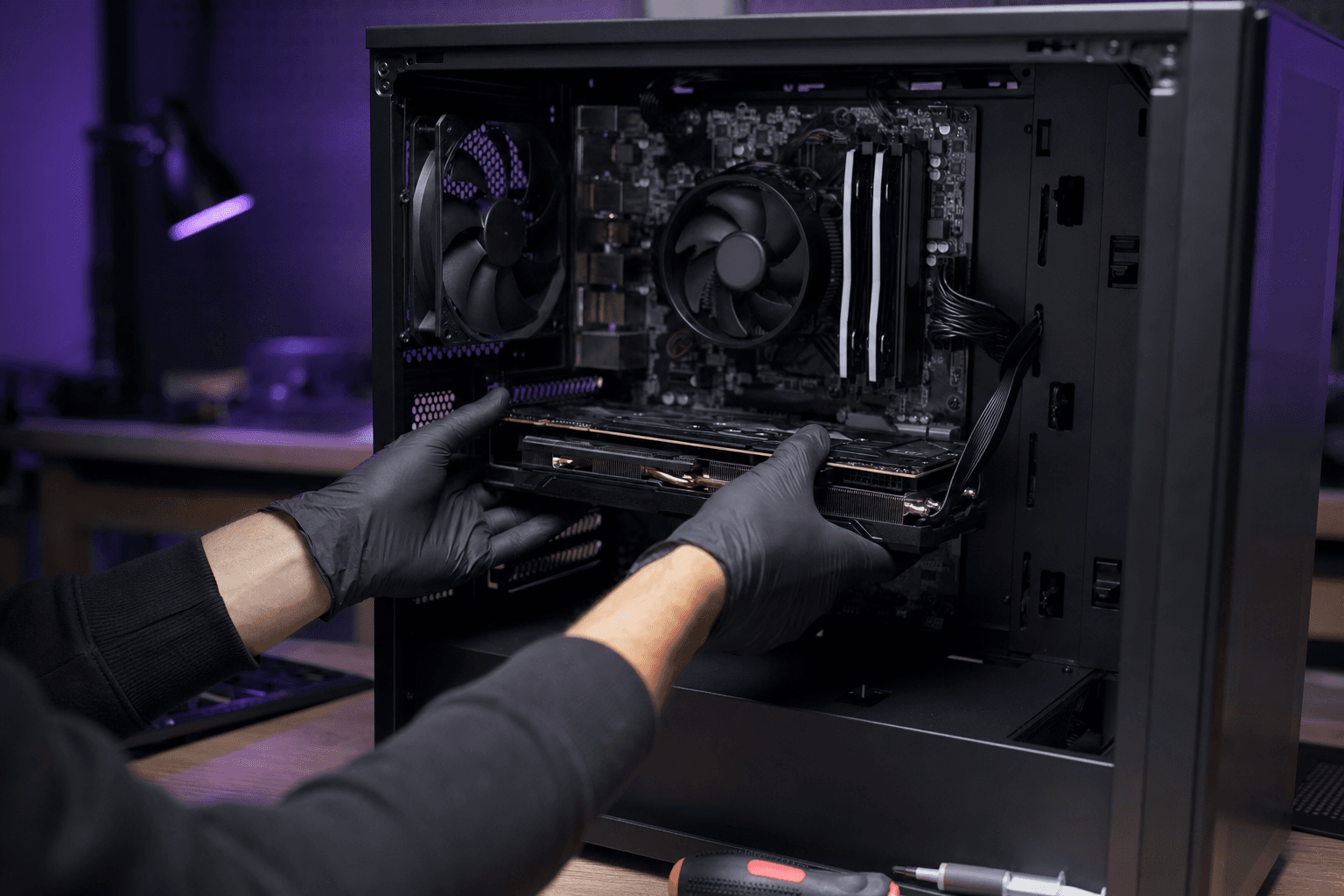
Which component should you upgrade first on an old gaming PC?
On an aging gaming PC, the right first upgrade is not « the most expensive GPU ». It is the part that actually limits your FPS, load times, or stability. In October 2026 the usual order is often NVMe SSD (if you still run an HDD), then 16 GB dual-channel RAM, then GPU, then CPU — but only after a 10-minute diagnosis. This PC4Games guide shows how to find the bottleneck, compares upgrade scenarios (US street prices on Amazon / Newegg / used), and sets the threshold where piecemeal parts stop making sense versus a new or prebuilt machine. Free tweaks first: optimize gaming PC performance. Once you pick the part: upgrade gaming PC.
Find your ideal PC on PC4Games
We match your games and budget with prebuilt Amazon PCs to surface the best-fitting configs.
How it works
Add your games
Your Steam library or a manual pick — you're in control.
Set your budget
From €400 to €2,000, you decide how much to spend.
Compare PCs
Score, specs and Amazon link — everything to choose with confidence.
The order that stops you wasting money
Before you buy anything, lock your target: 1080p 60 FPS AAA, 1080p 144 Hz competitive, or 1440p. Without that, you compare upgrades that answer different questions.
Then measure. In-game, open Task Manager (Performance) or better MSI Afterburner + RTSS. If the GPU sits at 95–99% and the CPU at 40–60%, the GPU is the limit. If the CPU hits 90–100% while the GPU stays under 70–80%, a stronger card barely moves 1% lows. If loads take 40 seconds on an HDD, the SSD comes before the GPU.
PC4Games rule: fix what breaks the experience first (RAM stutters, HDD, thermals), then what caps average FPS (GPU), then what kills 1% lows (CPU). A weak PSU or dead socket can make any GPU purchase useless.
| Symptom | Part to target | Indicative budget |
|---|---|---|
| Slow boot, texture pop-in, HDD | 1 TB NVMe SSD | $65–110 |
| 8 GB RAM, open-world crashes, Discord stutter | 2×8 GB dual-channel kit | $40–70 |
| GPU at 99%, low FPS at 1080p/1440p | GPU (e.g. RX 7600 / RTX 4060) | $220–350 |
| CPU at 95%+, GPU under 80% | Socket-compatible CPU | $100–220 |
| Dead socket + DDR3 / 450 W PSU | New PC or mobo+CPU+RAM kit | Often $700+ |
How to identify the bottleneck in 10 minutes
Launch a game that matches your library (not only Valorant if you mostly play Cyberpunk). Play five minutes for real: Discord open, target resolution, usual preset.
GPU-bound: high GPU use, FPS jump when you lower shadows or enable DLSS/FSR. CPU-bound: FPS barely move when you drop graphics, especially in open worlds or dense cities. RAM-bound: stutters on alt-tab, crashes, disk thrashing (Windows paging). Storage-bound: long Steam loads, texture streaming hitch.
Check thermals too. A CPU at 95 °C that throttles looks like a bad chip. Cleaning + paste can recover more FPS than a used Ryzen. Same for a GPU hitting 83–88 °C in a choked case.
Write down your exact motherboard, PSU (watt label + PCIe connectors), and max GPU length. Without that, the cart is a lottery.
When the SSD is the first part to change
If your library still lives on a spinning HDD, the SSD is almost always the best dollars-per-comfort. You may not gain 40 average FPS in Cyberpunk, but you cut load times by 3–10× and make Windows feel alive.
In 2026 a Gen3 or Gen4 1 TB NVMe for $65–110 is plenty for gaming. Premium Gen5 is not the priority on an old PC: most titles stay CPU-limited while unpacking assets.
Keep the HDD as archive if needed. Put Windows + active games on the NVMe. If you already have a fine SATA SSD and acceptable loads, move to RAM or GPU instead of buying NVMe for the sake of it.
When RAM comes before the graphics card
Still on 8 GB, or a single stick (single-channel)? RAM is often the first real upgrade. Open worlds, Fortnite, browsers with 30 tabs and Discord saturate 8 GB in 2026.
Target 16 GB dual-channel (2×8 GB) as the comfort floor. 32 GB if you stream, edit, or stack AAA + Chrome. Confirm DDR4 vs DDR5 on the motherboard manual before buying.
Enable XMP (Intel) or EXPO (AMD) after install. A 3200/3600 kit stuck at slow JEDEC speeds leaves FPS — especially 1% lows — on the table.
When the GPU is truly the next lever
Upgrade the GPU first only if it is saturated and SSD + RAM + thermals are already healthy. Example: RTX 2060 / GTX 1660 / RX 580 at 1080p High on recent AAA, 98% GPU, CPU at 50%.
Common US budgets (October 2026): RX 7600 / RTX 4060 around $220–350 for solid 1080p; step up for 1440p. A card that is too strong behind an i5-7400 or Ryzen 5 1600 wastes money: you pay for FPS the CPU will not release.
Check PSU wattage and connectors, plus case length. A great RTX that reboots under load for lack of power is the classic « wrong first part » story.
When the CPU (or mobo + CPU kit) should come first
The CPU becomes priority when the GPU stays underused, especially at 1080p competitive or in simulation / dense cities. Example: RTX 3060 + Ryzen 5 2600, GPU at 65%, CPU at 95% on 1% lows.
On a BIOS-updated B450 / B550, a Ryzen 5 5600 is often the best upgrade-per-dollar before touching the GPU. On very old Intel sockets, the platform ceiling arrives fast: compare a mobo + CPU + RAM kit to a prebuilt.
Do not swap the CPU because a forum said « you need 8 cores ». Swap it because your measurements show CPU-bound play.
Three concrete scenarios (2026)
Case A — 2017–2019 tower, HDD + 8 GB + GTX 1060. Order: NVMe (~$80), then 16 GB dual-channel (~$50), then RX 6600 / 7600-class GPU if the PSU allows (~$200–280). Roughly $330–410 for a playable 1080p machine. A decent new PC often starts near $700–900: piecemeal still wins.
Case B — Ryzen 5 3600 + RTX 3060 + 16 GB + SSD. The base is healthy. First lever depends on goal: stronger GPU for 1440p, or a 5600 CPU if you stay at 1080p competitive and the 3600 is the limit.
Case C — i5-6600K + aging DDR4 + 450 W PSU. A modern GPU is risky. Here the « first component » is no longer a single part: compare a platform kit or a prebuilt filtered in the PC4Games comparator against your Steam library.
| Situation | Targeted upgrade | New / prebuilt | Typical call |
|---|---|---|---|
| HDD + 8 GB + OK GPU | $130–180 | $700+ | Upgrade |
| 5-year GPU + living socket | $220–350 GPU | $800–1,200 | Upgrade if PSU OK |
| Dead socket + 450 W PSU | $400–600 kit | $750–1,000 | Compare both |
| Need 1440p 144 Hz AAA | $500+ GPU/CPU | $1,200+ | Often a coherent PC |
Upgrade one part or replace the whole PC?
A single-part upgrade stays worth it when one bottleneck explains ~80% of the pain, the socket / PSU / case still work, and the parts total stays under about 50–60% of an equivalent new PC.
Replace the machine (or platform kit) when you stack three blockers: dead socket, weak PSU, wrong RAM generation, case that no longer fits long GPUs. Stacking used parts then rebuilds a tower with no warranty.
Use the PC4Games comparator to see whether an $800–1,200 prebuilt beats three separate upgrades. Installation steps: upgrade gaming PC.
Checklist before you open Amazon or Newegg
Resolution / Hz goal written down. Symptom measured (GPU %, CPU %, RAM, disk). Thermals OK after cleaning. XMP/EXPO and drivers already tested via optimize gaming PC performance. Motherboard + PSU + GPU length known. Upgrade total compared to a same-tier prebuilt.
If you tick all of that, the « first component » is no longer a Reddit opinion: it is a decision tied to your real bottleneck, and much closer to a useful purchase on PC4Games.
Frequently asked questions
Which component should I upgrade first on an old gaming PC?
The one that actually limits your experience: SSD if you still use an HDD, RAM if you are on 8 GB or single-channel, GPU if it sits at 95–99% in-game, CPU if the GPU stays under 80% utilization. Measure before you buy.
Should I upgrade the graphics card first?
Only if Afterburner or Task Manager shows a saturated GPU and SSD, RAM, and thermals are already fine. Otherwise you pay for a card the CPU, RAM, or disk will not let you use.
SSD or RAM: which first?
HDD still holding your games: SSD first (about $65–110 for a 1 TB NVMe). Already on SSD but 8 GB RAM: move to 16 GB dual-channel (about $40–70). Both together often stay under $150.
How do I know if I am CPU-bound or GPU-bound?
In-game, GPU at 95–99% with CPU at 40–60% means GPU-bound. CPU at 90–100% with GPU under 70–80% means CPU-bound. Drop graphics settings: if FPS barely move, suspect the CPU or RAM.
When is it better to buy a new PC instead of upgrading?
When you stack a dead socket, a weak PSU, and obsolete RAM, parts often reach 50–60% of a coherent prebuilt ($700–1,200). Compare a platform kit or a new tower in the PC4Games comparator.
Can my power supply block a GPU upgrade?
Yes. A 450 W stock unit or one without proper PCIe 8-pin connectors will limit modern cards. Check recommended wattage and connectors before buying the GPU, not after the first crash.
Should I optimize Windows before upgrading?
Yes. Fresh GPU drivers, XMP/EXPO, a lean startup list, and free SSD space can recover 10–30% smoothness for free. Do that pass before ordering a part.
Sources & methodology
How we wrote this guide
PC4Games decision guide (October 2026): prioritize the limiting part on an old gaming PC, US street budgets, upgrade vs new PC threshold.
An AI helps draft this article. Thomas Laize reviews it, checks official specs (Steam, vendors) and signs off on the recommendations.
- Diagnosis from in-game GPU/CPU/RAM/disk utilization (Afterburner / Task Manager).
- Indicative US street prices (Amazon, Newegg, used), October 2026.
- Anti-cannibalization: decision here; install steps in upgrade-gaming-pc; free tweaks in optimize-gaming-pc-performance.
- Editorial update: October 14, 2026.

Similar articles
 Buying tips16 min read
How to choose a gaming monitor: 1080p $180 vs 1440p $280
How to choose a gaming monitor: 1080p 144 Hz from $180 for CS2 and Valorant. 1440p 165 Hz from $280 if your GPU can feed it. Then IPS or OLED on Amazon.
16 min readRead article Buying tips14 min read
GTA 6 news September 2026: Extended Look, Twitch, and pricing
GTA 6 Sept 2026: Extended Look on Netflix (Aug 27), Twitch outage, YouTube gameplay, official trailer, $79.99 pricing, console launch November 19.
14 min readRead article Buying tips28 min read
Best free PC games in 2026 (Steam, Epic, Riot)
Best free PC games 2026: 28 official F2P (Fortnite, CS2, Valorant…). US 1080p budgets $450–875, store links and a free PC picker. September 2026.
28 min readRead article Buying tips15 min read
How to choose a gaming PC in 2026 (US): method by player profile
Best gaming PC 2026: how to choose by FPS, 1440p, streaming, CPU/GPU/RAM and budget. US method with Amazon, Newegg and PC4Games.
15 min readRead article Buying tips12 min read
Is Pokémon Champions on PC in 2026?
Is Pokémon Champions on PC? No Steam or Windows client in September 2026. Switch, Switch 2, iOS, Android only. Emulator risks and safe download sources.
12 min readRead article- Buying tips14 min read
Upgrade a gaming PC in 2026: GPU first, then RAM
Upgrade a gaming PC in 2026: GPU first, then RAM or SSD. US parts $80–$350, socket/PSU checks, and when a new Amazon prebuilt wins.
14 min readRead article
PC4Games
Take action with the comparator: pick your games, budget, then compare PCs.


Comments
Loading…
Sign in or create an account to comment on this article.