

Guide
Best PC for WARDOGS in 2026: what to buy
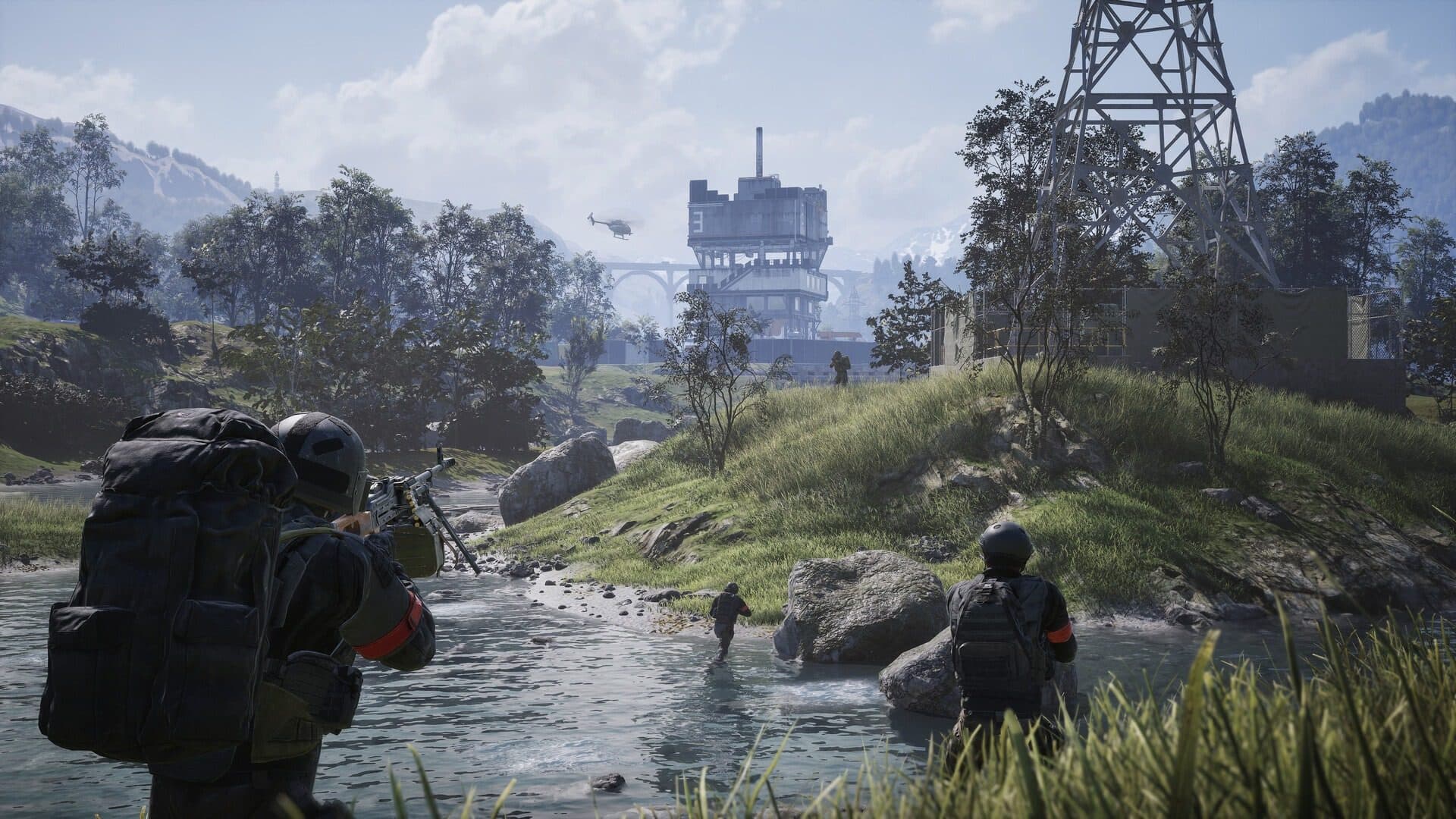
In September 2026, WARDOGS (Bulkhead / Team17, Early Access since September 10, 2026) has already passed 1.5 million copies sold. It sits between DayZ, Battlefield, and Arma: militarized sandbox, large-scale battlefield chaos, and more deliberate gunplay, with up to 100 players across three teams, destruction, vehicles, and persistent cash. On the hardware side, Steam already wants 16 GB of RAM, a GTX 1660 minimum, and closer to an RTX 3070 (or equivalent) for 1440p comfort. This guide helps you pick a gaming PC in the US (Amazon.com, Newegg) without getting stuck with an « 8 GB + HDD » tower that launches the client, then hitchs as soon as the Control Zone fills up. Prices below are before tax.
Find your ideal PC on PC4Games
We match your games and budget with prebuilt Amazon PCs to surface the best-fitting configs.
How it works
Add your games
Your Steam library or a manual pick — you're in control.
Set your budget
From €400 to €2,000, you decide how much to spend.
Compare PCs
Score, specs and Amazon link — everything to choose with confidence.
Find 2–3 PCs that fit WARDOGS
With the PC4Games comparator, select WARDOGS, your pre-tax budget, desktop or laptop: we match the game’s requirements with Amazon/Newegg towers and a compatibility score. Handy if you do not want to compare ten GPU listings by hand.
A DayZ, Battlefield, and Arma mix: why it stresses the PC
Coming from DayZ, you will recognize the sandbox / decision / logistics layer. Coming from Battlefield, the scale (vehicles, destruction, mass pushes) will feel familiar. Coming from Arma, the slower gunplay and map reading matter as much as spray control. That cocktail, in 100-player matches, is why WARDOGS is not a tiny 5v5 tactical: CPU, RAM, and SSD work alongside the GPU as soon as the zone fills up.
The launch smash (1.5 million copies already reported after Early Access) confirms demand, and it also means a heavier client and server load: buy a build with headroom (real 16 GB minimum, 50 GB+ SSD) instead of a marketing-floor tower.
WARDOGS Steam specs: minimum vs recommended
The Steam WARDOGS page lays out the floor clearly. The minimum targets 1080p Low at 60 FPS (often upscaled): Windows 10, Core i5-8600 or Ryzen 5 3500, 16 GB RAM, GTX 1660 / RX 590, 50 GB of space. The recommended targets 1440p Medium around 70 FPS (or 4K Medium upscaled): Windows 11, i7-12700K / Ryzen 7 5700X, still 16 GB, RTX 3070 / RX 6700 XT, 50 GB. In practice, Discord, the launcher, and the kernel anti-cheat Elytra eat RAM: aim for 16 GB dual-channel on day one, and 32 GB if you stream or leave Chrome + OBS open.
The game already weighs 50 GB installed: an NVMe SSD with headroom (ideally 1 TB free for Windows + Early Access patches) avoids texture pop-in when a whole block gets leveled mid-push.
| Steam tier | CPU | GPU | RAM / storage | Stated target |
|---|---|---|---|---|
| Minimum | i5-8600 / Ryzen 5 3500 | GTX 1660 / RX 590 | 16 GB / 50 GB | 1080p Low ~60 FPS (upscale) |
| Recommended | i7-12700K / Ryzen 7 5700X | RTX 3070 / RX 6700 XT | 16 GB / 50 GB | 1440p Medium ~70+ FPS (native) |
Under $975: the credible floor
Below $975 before tax in the US, you stay close to the Steam minimum. Absolute priorities: 16 GB RAM (2×8 GB) and an SSD, then a GPU at least GTX 1660 / RX 6600. An 8 GB or HDD tower will launch WARDOGS, but you will pay in micro-stutters as soon as three teams converge on the zone.
At this band, look hard at used or refurbished (Amazon Warehouse, reputable Marketplace sellers): a used RTX 3060 or RX 6700 fits 100-player gameplay better than a new under-specced « gaming » SKU. Skip laptops without a clearly named discrete GPU.
From $975 to $1,425: the real 1080p sweet spot
This is where WARDOGS gets comfortable at 1080p High / Ultra without chasing 4K. Target a Ryzen 5 5600 / i5-12400F (or better), an RTX 4060 / 5060 or RX 7600, 16 GB (jump to 32 GB if the kit does not blow the budget), and a 1 TB NVMe.
Why this band matters: the game rewards teamplay (revives, logistics, vehicles, FOB building). You want stable FPS when a heli orbits the zone and artillery starts flattening buildings, not just a synthetic GPU score. Filter this budget in the comparator.
From $1,425 to $1,950: 1440p comfort near Steam recommended
Here you approach the official recommended tier (RTX 3070 / RX 6700 XT as the reference). In 2026, an RTX 4060 Ti / 5070 or RX 7700 XT / 9060 XT in a new tower around $1,750 before tax is a solid match for 1440p Medium–High. Keep a recent 6–8 core CPU: player density plus vehicles load the processor too.
Plan for 32 GB RAM if you stream WARDOGS or record clips: persistent cash and long sessions push you to leave plenty of apps open between matches.
Above $1,950: 4K, competitive, or streaming
Past $1,950–$2,400 before tax, you are paying for 1440p Ultra / 4K upscaled comfort, Early Access headroom (patches, heavier maps), and multitasking (Discord, browser, OBS). RTX 5070 Ti / 5080 or AMD equivalent, 32 GB, fast NVMe. Worth it if WARDOGS is only one of several 2026 AAA titles on the same machine.
Beyond that, the gain shows mostly in resolution and frame-time stability, not in « unlocking » the 100-player mode: that already runs fine once a solid recommended build is in place.
You already own a PC: what to upgrade first
If WARDOGS already stutters, start with RAM: moving from 8 to 16 GB dual-channel (ideally 32 GB if you stream) is often the clearest win for the money. Then the SSD if the game still lives on an HDD: 50 GB install + Early Access patches + texture streaming on a destructible map, you feel it.
The GPU comes third, once RAM and storage are healthy: aim at least for 1660 / 3060 level, and 3070 / 6700 XT level if you want Steam’s 1440p comfort. Upgrade the CPU only if you are stuck on a very old quad-core while the GPU is already fine.
Early Access, Elytra anti-cheat, and buying traps
WARDOGS is in Early Access (about 1 to 2 years announced by the developers): performance shifts with every patch. Buy a config with a little headroom (especially SSD and RAM), not « exactly today’s minimum ». The game uses the kernel anti-cheat Elytra: check compatibility if you run unusual low-level tools, and keep Windows updated.
On Amazon.com listings, refuse towers that hide the GPU behind a marketing slogan. You want the exact card name, the real RAM amount, and a confirmed SSD. For a neighboring FPS that is gentler on entry-level GPUs, see also Delta Force; for a large EA battlefield, Battlefield 6.
New, refurbished, or used?
Under $1,200, used / refurbished makes sense: a used RTX 3070 or RX 6700 XT lands right on Steam’s recommended tier. Above $1,425, new with Amazon / manufacturer warranty is more reassuring on an expensive card, especially if you plan to keep the machine through 3–4 years of Early Access and then 1.0.
Frequently asked questions
What games is WARDOGS a mix of?
Players often place it between DayZ (sandbox / decisions), Battlefield (scale, vehicles, destruction), and Arma (slower gunplay, map reading). That cocktail in 100-player matches loads CPU, RAM, and SSD harder than a small 5v5 tactical.
How many copies has WARDOGS already sold?
After the September 10, 2026 Early Access launch, WARDOGS has already passed 1.5 million copies sold (after clearing one million in the opening hours). Strong demand also means you want a PC with a bit of headroom.
What are the WARDOGS PC requirements in 2026?
Steam lists 16 GB RAM, an i5-8600 / Ryzen 5 3500, and a GTX 1660 / RX 590 for 1080p Low. Recommended is an i7-12700K / Ryzen 7 5700X with an RTX 3070 / RX 6700 XT for 1440p Medium. Plan a 50 GB SSD install with headroom for Early Access patches.
What’s a sensible US budget for WARDOGS?
Around $900 before tax is a credible floor with 16 GB + SSD. The sweet spot for comfortable 1080p is roughly $900–$1,300; 1440p near Steam recommended sits closer to $1,300–$1,800 on Amazon.com / Newegg.
Is 16 GB RAM enough for WARDOGS with Discord?
Yes for most players. Steam already requires 16 GB. Move to 32 GB if you stream, record, or leave Chrome + launcher + anti-cheat open between matches.
Do I need an SSD for WARDOGS?
Yes. The listed install is 50 GB, Early Access patches grow the folder, and destructible maps stream a lot of assets. An HDD often shows up as texture pop-in and hitching.
Laptop or desktop for WARDOGS?
Desktops still win on performance per dollar. A laptop works with a named dedicated GPU at least 1660 / 3060-class, 16 GB RAM, and plugged-in play.
Why is WARDOGS heavier than a small tactical FPS?
Up to 100 players on three teams, vehicles, destruction, and a moving control zone stress CPU and GPU together. Buy for that density, not for a quiet 5v5 range map.
Should I worry about Elytra anti-cheat?
Elytra is a kernel-level anti-cheat listed on Steam. On a normal updated Windows PC most players are fine. Avoid exotic low-level tools and re-check Steam notes after big patches.
What should I upgrade first if WARDOGS stutters?
RAM first (16 GB minimum, 32 GB if streaming), then SSD if you’re still on a hard drive, then GPU toward the 3070 / 6700 XT comfort tier.
Sources & methodology
How we wrote this guide
PC4Games WARDOGS buying guide (updated September 15, 2026). Cross-checked with the official Steam page (app 1867240) and US street prices on Amazon.com / Newegg. Budgets are indicative before sales tax.
- Page angle: what PC to buy for WARDOGS (100-player Early Access), not a specs dump alone.
- Practical priority: 16 GB dual-channel + 50 GB+ SSD before climbing GPU tiers only.
- This URL owns the “PC for WARDOGS” intent; the comparator stays the multi-game tool.

Similar articles
 Builds & budgets14 min read
GTA RP FiveM and NoPixel V: which PC and tips in 2026?
What PC for GTA RP (FiveM) and NoPixel V in 2026? 6-core CPU, 16 GB RAM, SSD, $700–$1,300-class builds after Rockstar’s Sep 2026 announcement.
14 min readRead article Builds & budgets14 min read
Which PC for Modern Warfare 4 before the October 23, 2026 launch?
MW4 launches Oct 23, 2026 (~5 weeks). Activision beta specs, RTX 3060 Ti, TPM 2.0, SSD, $750 – $1600 USD tiers and Amazon buying checklist.
14 min readRead article Builds & budgets14 min read
Best PC for Delta Force in 2026 (Season Reorientation)
Best PC for Delta Force Season Reorientation (Sept 2026): 16 GB RAM + SSD first, US budgets $600–$1,525, upgrade order, and Amazon pitfalls.
14 min readRead article Builds & budgets16 min read
WoW Forever on PC: what you need before November 4, 2026
WoW Forever PC guide (Sep 2026): Nov 4 launch 3pm PST, Sep 17 beta, Hyjal raids, Skyborne. Budgets $300–$475 to $900–$1,150.
16 min readRead article Builds & budgets12 min read
GTA 6 PC requirements in 2026
GTA 6 has no PC version as of September 2026. Projected min and reco specs, 12 GB VRAM, SSD size, and US Amazon/Newegg budgets before any PC port.
12 min readRead article Builds & budgets17 min read
Best gaming PC 2026 in the US: which tier fits your profile (not one ranked winner)
Best gaming PC in the US 2026: $800, $1,000 and $1,500 towers, RTX 5060 / 5070, Newegg vs Micro Center. Skip i7 + weak GPU listings (September 2026).
17 min readRead article
PC4Games
Take action with the comparator: pick your games, budget, then compare PCs.


Comments
Loading…
Sign in or create an account to comment on this article.